



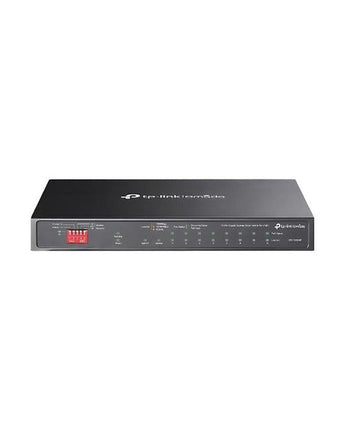
 TP-LINK-DS110GMP Omada 10-Port 8-Port PoE+Gigabit Desktop Switch
 TP-LINK-DS110GMP Omada 10-Port 8-Port PoE+Gigabit Desktop Switch – view 2
 TP-LINK-DS110GMP Omada 10-Port 8-Port PoE+Gigabit Desktop Switch – view 3
 TP-LINK-DS110GMP Omada 10-Port 8-Port PoE+Gigabit Desktop Switch – view 4
 TP-LINK-DS110GMP Omada 10-Port 8-Port PoE+Gigabit Desktop Switch – view 5
TP-LINK
TP-LINK Omada 10-Port 8-Port PoE+Gigabit Desktop Switch TP-LINK-DS110GMP
/
Shipping calculated at checkout.
This price is GST-exclusive
Couldn't load pickup availability
Payment
Know more about this product
Overview
The TP-LINK Omada 10-Port 8-Port PoE+Gigabit Desktop Switch, also known as the TP-LINK-DS110GMP, is a high-performance networking device designed for professional use. With 10 ports and 8 PoE+ ports, this switch provides fast and reliable connectivity for your network. Perfect for businesses and industries that require increased bandwidth and power for their data transmission needs.
- 9× Gigabit RJ45 ports, and 1× Gigabit combo SFP/RJ45 Port
- 8× PoE+ ports transfer data and power via a single cable with a total power budget of 123 W*
- Compliance with IEEE 802.3af/at PoE+, the switch supports PoE Power up to 30 W for each PoE port
- Up to 250 m (820ft) data and power transmission range under Extend Mode**
- Priority Mode ensures high priority of ports 1–2 to guarantee the quality of the sensitive applications
- Isolation Mode allows one-click client traffic separation for higher security and performance
- Automatically reboots your dropped or unresponsive PoE-powered devices with PoE Auto Recovery.
- Plug and Play. No configuration or central management required.†
- Fanless design reduces power consumption and works silently in its location
Key Features & Technical Specifications
| Feature | Specification |
|---|---|
| Brand | TP-LINK |
| Model | TP-LINK-DS110GMP |
| Weather / Impact Rating | Indoor |
| PoE Ports | 8 ports |
| Switch Type | Unmanaged |
| Product Group | Networking |
| Key point | 9× Gigabit RJ45 ports, and 1× Gigabit combo SFP/RJ45 Port |
| Key point | 8× PoE+ ports transfer data and power via a single cable with a total power budget of 123 W* |
| Key point | Compliance with IEEE 802.3af/at PoE+, the switch supports PoE Power up to 30 W for each PoE port |
| Key point | Up to 250 m (820ft) data and power transmission range under Extend Mode** |
| Key point | Priority Mode ensures high priority of ports 1–2 to guarantee the quality of the sensitive applications |
| Key point | Isolation Mode allows one-click client traffic separation for higher security and performance |
How to use this product - from Virtus experts
These guides are created by our experts with years of real-world security surveillance experience. Get a free project quote tailored to your needs — contact our team at Virtus Electronics today.
Ideal Use Cases
Buyer Tips
FAQs
Recently viewed products
Your recently viewed products here